Bus Simulator Indonesia
Bus Simulator Indonesia guide with APK, mods, skins, liveries, multiplayer, controls, updates, and useful BUSSID resources for players.
★★★★★
Bus Simulator Indonesia
Bus Simulator Indonesia (BUSSID) is a bus-driving simulation game built around the experience of driving buses through Indonesian-inspired roads, cities, villages, and terminals. The game combines everyday bus driving with vehicle customization, route-based gameplay, custom liveries, and community-created vehicle content. Its focus on local environments and recognizable Indonesian bus styles gives the driving experience a distinct character compared with many general-purpose driving simulators.
Whether you enjoy completing routes, customizing buses, experimenting with different controls, or exploring community-made content, BUSSID offers several ways to make each trip your own. The game is also known for its customization and modding ecosystem, allowing players to go beyond the standard vehicles and personalize their experience.
On this website, you can find information about Bus Simulator Indonesia, including APK details, features, mods, bus skins, liveries, installation guides, troubleshooting tips, and other useful resources for BUSSID players.
What Is Bus Simulator Indonesia?
Bus Simulator Indonesia is a driving simulation game centered on operating buses in an Indonesian setting. Instead of focusing only on fast driving, the gameplay involves managing a bus on roads and routes while dealing with traffic, turns, stops, parking, and other situations that make each journey feel like a bus-driving task.
A major part of the game’s identity comes from its Indonesian environment. Roads, buildings, buses, terminals, signs, and surrounding scenery are designed to create a local atmosphere. Players can drive through different types of environments, from busy urban areas to quieter roads and rural locations.
The game also puts considerable attention on customization. Players can personalize compatible buses with different visual designs and liveries, while supported mods can expand the range of vehicles and other content available to them.
Get Behind the Wheel in Indonesia
The core BUSSID experience starts with choosing a bus and taking it onto the road. Driving requires more than simply accelerating and steering. Depending on the route and situation, players need to manage turns, traffic, braking, parking, and other aspects of a bus journey.
This makes the game suitable for players who enjoy a slower and more deliberate driving experience. A long route can involve multiple stops and different road conditions, giving players opportunities to practice their driving and become familiar with the controls.
Explore Cities, Villages, and Rural Roads
One of the recognizable aspects of Bus Simulator Indonesia is its variety of Indonesian-inspired environments. A journey can take players through developed areas, smaller towns, villages, and stretches of road surrounded by scenery.
The changing surroundings help prevent every route from feeling identical. Traffic levels, road layouts, buildings, terminals, and environmental details all contribute to the overall driving atmosphere.
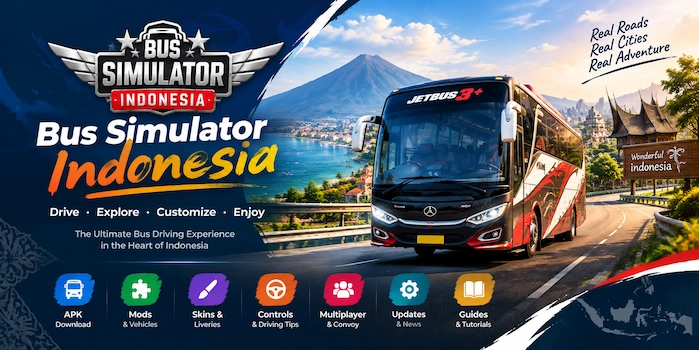
Bus Simulator Indonesia Features
BUSSID combines simulation-focused driving with customization and community content. Its features are designed to give players control over both the way they drive and the appearance of their vehicles.
Realistic Indonesian Environments
The game uses Indonesian-inspired environments to create a recognizable local setting. Players can encounter roads, buildings, traffic, terminals, and countryside scenery while completing their journeys.
Rather than placing buses in a generic city, the environment is an important part of the game’s identity. This is particularly appealing to players interested in Indonesian buses and road culture.
Authentic Indonesian Buses
Buses are at the center of the gameplay. Players can select from different bus designs and experience different styles of vehicles while traveling across routes.
The appearance and design of the buses also provide an important part of the customization experience. Players who enjoy collecting or customizing vehicles can combine different buses with compatible skins, liveries, and other supported content.
Detailed Bus Customization
Customization allows players to change the appearance of their bus rather than using the same standard design throughout the game.
Depending on the supported vehicle and content, customization can include visual elements such as:
- Bus liveries
- Custom skins
- Exterior designs
- Vehicle appearance
- Other visual details
This is one reason BUSSID has developed a large community around custom content.
BUSSID Modding System
Community-created modifications are another important part of the BUSSID ecosystem. Mods can introduce additional vehicles or other compatible content that isn’t part of a player’s standard selection.
Common categories include:
- Bus mods
- Truck mods
- Car and vehicle mods
- Map-related modifications
- Other community-created content
Compatibility matters when using mods. A modification created for a particular game version or vehicle may not work correctly after an update or when used with an incompatible setup.
Multiple Control Options
Bus Simulator Indonesia provides different ways to control a vehicle, allowing players to choose a setup that feels comfortable on their device.
New players may need some time to become comfortable with steering, braking, acceleration, and turning a larger vehicle. Trying different control settings can make the driving experience easier to manage.
For beginners, practicing on less complicated routes before attempting difficult journeys can also help build familiarity with the controls.
Routes, Rewards, and Progression
Route-based driving gives the game a purpose beyond simply moving around the map. Players can complete journeys and work through the game’s progression systems while driving passengers between destinations.
Completing routes can also give players a reason to explore different areas and become more familiar with their buses and driving controls.
Weather and Driving Conditions
Environmental conditions can contribute to the atmosphere of a bus journey. Changes in lighting, time of day, and weather-related conditions can make familiar roads feel different.
For players who prefer simulation-style gameplay, these environmental changes add another layer to the experience instead of keeping every trip visually identical.
Multiplayer and Convoy Features
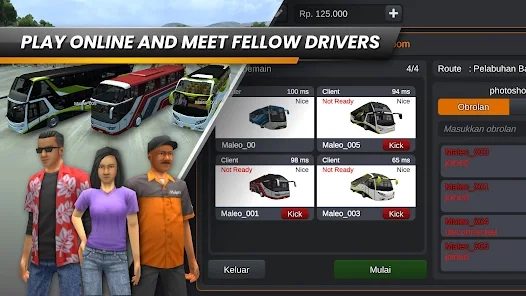
BUSSID also includes multiplayer-oriented features that allow players to share the driving experience with other users where supported.
Convoy-style gameplay can make a regular bus journey more social, especially for players who enjoy driving alongside friends or other members of the community.
Multiplayer functionality can depend on the current version and connection requirements, so players should check the latest game information when setting up an online session.
Bus Simulator Indonesia APK
For Android users, the Bus Simulator Indonesia APK is the Android application package used to install the game outside the standard app-store interface. Before installing any APK, it is important to check the version, Android compatibility, file size, and source of the file.
BUSSID can receive updates that change features, fix problems, or affect compatibility with older modifications. For that reason, the version information shown on a download page should always correspond to the file being offered rather than relying on an outdated number.
What Is the Bus Simulator Indonesia APK?
An APK is the package format used by Android to distribute and install applications. When you download a BUSSID APK, you are obtaining the installation package for the Android version of the game.
The APK itself does not automatically mean that the game is modified. An official APK and a modified APK (MOD APK) are different things. A standard APK contains the game’s normal functionality, while a MOD APK may have been changed by a third party.
Before installing an APK, check:
How to Install Bus Simulator Indonesia APK
Android installation can vary slightly between devices and Android versions, but the general process is straightforward.
- Download the APK from the appropriate download page.
- Open your Downloads folder and locate the downloaded file.
- If Android asks for permission to install an application from that source, review the setting and allow it only if you trust the source.
- Start the installation and wait for it to finish.
- Open BUSSID from your app list.
- Allow any required permissions and complete the initial setup.
- Check that the game works correctly before adding additional mods or custom content.
If the APK doesn’t install, check whether your device has enough storage and whether the APK is compatible with your Android version.
Bus Simulator Indonesia Mods
Mods are one of the most interesting parts of the BUSSID community. A Bus Simulator Indonesia mod can add or alter compatible game content, giving players more options beyond the standard vehicles and environments.
Mods are created and distributed by different members of the community, so quality, compatibility, and installation methods can vary.
What Are Bus Simulator Indonesia Mods?
A mod is a community-created modification designed to work with the game. Depending on the type of modification, it may add a new vehicle, replace an existing design, or provide other compatible content.
The most common categories include:
- Bus mods
- Truck mods
- Car mods
- Other vehicle mods
- Map-related mods
Not every mod works with every game version. If a mod was created for an older release, an update to BUSSID may cause compatibility problems.
Bus Mods
Bus mods allow players to expand the selection of vehicles available for their driving experience. Community-created bus models can represent different designs, sizes, and styles.
Before installing a bus mod, check which game version it supports and whether it requires a particular bus type or additional files.
Truck and Other Vehicle Mods
The BUSSID modding community isn’t limited to buses. Depending on available community content, players can also find trucks, cars, and other vehicle modifications.
These modifications can make the game more varied for players who enjoy experimenting with different types of vehicles.
Map Mods
Map-related modifications can provide alternative environments or expand the places available for driving. Because maps can involve multiple game elements, compatibility is especially important.
Always check the instructions supplied with a particular map before attempting installation.
How Bus Simulator Indonesia Mods Work
The exact process depends on the modification and the current version of the game. Some mods may be designed for straightforward importing, while others may require additional files or specific placement.
A good mod guide should therefore explain the file type and installation procedure instead of assuming that every modification works in exactly the same way.
Bus Simulator Indonesia Mod Compatibility
Compatibility is one of the most common reasons a modification may fail.
Before installing a mod, check:
- Supported BUSSID version
- Mod file format
- Required vehicle or map
- Available storage
- Android compatibility
- Installation instructions
If the game has recently been updated, older community-created modifications may need to be updated as well.
Bus Simulator Indonesia Skins & Liveries
Bus customization is another major part of the BUSSID experience. Bus Simulator Indonesia skins and liveries allow players to change the visual appearance of compatible buses and create a more personalized vehicle.
The terms skin and livery are sometimes used interchangeably, although they can describe slightly different aspects of vehicle customization.
What Are Bus Simulator Indonesia Skins and Liveries?
A livery generally refers to the visual design applied to a vehicle, including colors, patterns, logos, lettering, and other decorative elements. A skin is also commonly used to describe a custom appearance or texture.
In practical BUSSID discussions, you may see both terms used for custom bus designs.
Unlike a complete vehicle mod, a livery generally focuses on how the compatible bus looks rather than introducing an entirely different vehicle.
Bus Simulator Indonesia Livery
A custom livery can give a standard bus a completely different appearance. Players can find designs inspired by different Indonesian bus styles, fictional operators, community creations, and other visual themes.
The correct livery needs to match the bus it was designed for. A design made for one model may not display correctly on another vehicle.
Bus Simulator Indonesia Bus Skin
Bus skins provide another way to personalize a vehicle. Depending on the design, a skin may change colors, graphics, branding, patterns, or other visual elements.
When looking for a skin, check its compatibility before downloading it. This can save time and prevent problems caused by applying the wrong design to a vehicle.
Bus Simulator Indonesia Skin Download
When downloading a BUSSID skin, pay attention to the information provided with the file.
Check:
- Compatible bus model
- File format
- Image dimensions or resolution where specified
- Game version
- Installation method
- Whether the file requires additional content
Avoid assuming that every skin can be applied to every bus. Compatibility is one of the most important details when working with custom liveries.
Livery vs Bus Mod
A livery primarily changes the appearance of a compatible vehicle, while a bus mod can introduce a different vehicle or modify the vehicle itself.
For example, you might use a bus mod to add a particular bus model and then apply a compatible livery to change its exterior design.
Understanding this difference makes it easier to find the right type of content.
How to Install a Bus Simulator Indonesia Livery
The installation process can depend on the current version of BUSSID and the type of livery file.
A typical workflow is:
- Download a livery compatible with your bus.
- Check the file and accompanying instructions.
- Open the relevant vehicle customization or livery option in BUSSID.
- Select or import the appropriate design.
- Apply the livery to the compatible bus.
- Check the result before starting a route.
If the design doesn’t appear correctly, verify that you’ve selected the correct bus and that the livery is compatible with your current game version.
Bus Simulator Indonesia Unlimited Money
The phrase Bus Simulator Indonesia unlimited money usually refers to a modified version of the game that claims to alter the normal in-game currency system.
This is different from the standard version of BUSSID. Whether a modified version actually provides a particular feature depends on the modification and version being distributed.
What Does Unlimited Money Mean in Bus Simulator Indonesia?
In a modified version, “unlimited money” generally means that the game’s normal currency restrictions have been changed so that the player has access to substantially more in-game currency than they would normally earn through gameplay.
The purpose is usually to make vehicles or other in-game purchases accessible without following the normal progression system.
However, players should distinguish between advertised MOD features and features that have actually been verified in a particular release.
How Unlimited Money Can Change Gameplay
Having additional in-game currency can change how quickly a player accesses available purchases or customization options.
It may reduce the progression element associated with earning currency through regular gameplay. For players who enjoy unlocking content naturally, the standard version can provide a different experience.
Unlimited Money vs the Official Version
The standard game follows its normal progression and economy, while a modified version may change one or more parts of that system.
| Aspect | Standard Version | Modified Version |
| Game content | Official | Depends on the modification |
| Currency | Normal game economy | May be modified |
| Updates | Provided through official channels | May require a separate updated file |
| Compatibility | Designed for the official release | Can vary |
| Modifications | Standard functionality | Depends on the MOD |
Modified versions can also become incompatible after a game update. A feature advertised for one release shouldn’t automatically be assumed to work in another.
Version and Compatibility Considerations
If you’re researching an unlimited-money version, always check the specific version number and modification details. A modified APK from an older release may not work correctly with newer game data.
It’s also important to understand that third-party modified files are not the same as official releases and can carry additional security and reliability considerations.
Common Problems With APKs and Mods
Custom files can occasionally create problems, particularly when the game version and downloaded content don’t match.
APK Won’t Install
Check your Android version, available storage, file integrity, and whether the APK is compatible with your device.
Game Crashes After Installing a Mod
Remove the recently installed modification and check whether it supports your current BUSSID version.
Mod Does Not Appear
Verify that the file was placed or imported using the correct method and that the file format is supported.
Livery Looks Incorrect
Make sure the livery was designed for the exact bus model you’re using. An incompatible design may not align properly.
Game Becomes Slow
Large game files, additional content, and device limitations can affect performance. Freeing storage and removing unnecessary modifications may help.
Multiplayer Problems
Check your internet connection and make sure everyone involved is using compatible game versions and supported content.
How to Play Bus Simulator Indonesia
Getting started with Bus Simulator Indonesia is relatively straightforward, but new players may need some practice before they feel comfortable handling a large bus on busy roads. The best way to learn is to begin with the basic controls and gradually move to longer or more demanding routes.
Choose Your Bus
Start by selecting a bus that suits your preferred driving style. Different vehicles can have different appearances and handling characteristics, so spending some time with the available options can help you find a bus you enjoy driving.
Once you’re comfortable with the standard vehicles, you can explore compatible community-created bus mods and customization options.
Select a Route
Routes provide the structure for a typical BUSSID journey. Choose an available destination and familiarize yourself with the route before beginning a longer trip.
Pay attention to turns, intersections, terminals, and areas with heavier traffic. Knowing the route makes it easier to concentrate on driving instead of constantly trying to determine where to go next.
Configure Your Controls
Before starting a serious route, test the available control options. Depending on your device and preferences, you may find one control method more comfortable than another.
Spend a few minutes practicing:
- Steering
- Acceleration
- Braking
- Turning
- Parking
- Reversing
Good control over these basic actions makes longer journeys much easier.
Start Driving
Once your bus and controls are ready, begin the route and drive according to the road conditions.
Avoid excessive speed, give yourself enough room to turn, and pay attention to traffic. Large buses require more space to maneuver than smaller vehicles, so anticipating turns and braking early can make driving more consistent.
Follow Traffic Rules
Following traffic signals and driving carefully adds to the simulation experience. Stop when necessary, maintain control around intersections, and avoid making sudden movements around other vehicles.
Players who are new to bus simulators can use quieter routes to practice before moving into areas with heavier traffic.
Complete Routes and Earn Rewards
Completing routes gives you a reason to keep exploring the game. Regular journeys can also help you become more familiar with different buses, road layouts, controls, and environments.
Instead of immediately trying to master every feature, focus on completing routes successfully and improving your driving skills over time.
Bus Simulator Indonesia Controls
Controls have a major effect on the driving experience. A control scheme that feels comfortable for one player may feel less natural to another, so experimenting with the available options is worthwhile.
Steering Controls
Steering is especially important when operating a large bus. Smooth movements generally make it easier to stay within your lane and negotiate turns.
When approaching a corner, reduce your speed before turning and allow enough room for the rear of the bus to follow the intended path.
Button Controls
Button-based controls can provide a straightforward way to manage steering and other driving actions. New players may find them useful while learning the game’s basic mechanics.
Try different settings and sensitivity levels where available until the bus responds comfortably to your input.
Control Settings
Take some time to review the game’s control settings before starting longer routes. Adjusting the available options can make steering, braking, and acceleration easier to manage.
If a control arrangement feels uncomfortable, changing it is usually more useful than trying to force yourself to play with a setup you don’t enjoy.
Tips for New Players
A few simple habits can make learning easier:
- Practice on less complicated routes.
- Avoid excessive speed.
- Brake before sharp turns.
- Leave enough distance between vehicles.
- Practice reversing and parking.
- Learn the route before attempting difficult journeys.
- Try different control settings.
Bus Simulator Indonesia Requirements
Before installing or updating BUSSID, check your device’s compatibility and available storage. Requirements can change between releases, so the latest information should be checked against the particular version you intend to use.
| Requirement | What to Check |
| Platform | Android or another officially supported platform |
| Android version | Check the requirement for the current release |
| Storage | Ensure sufficient free space for the game and additional content |
| Internet | Required for features that depend on online connectivity |
| Performance | Device hardware can affect graphics and gameplay smoothness |
| Additional content | Mods and custom files may require extra storage |
Can Bus Simulator Indonesia Run on Low-End Phones?
Whether BUSSID runs comfortably on a lower-specification device depends on the device’s hardware, available memory, storage, operating-system version, and the amount of additional content installed.
Performance can also vary depending on graphics settings and what is happening in the game. If you’re experiencing slow performance, reducing demanding settings where available and removing unnecessary custom content can help.
Storage and Performance Tips
BUSSID and its additional content can require significant storage, particularly if you collect multiple vehicle mods, maps, skins, or other files.
Keep enough free storage available and periodically remove content you no longer use. This can also make it easier to identify which modification is causing a problem if something goes wrong.
Bus Simulator Indonesia Graphics and Driving Experience
Visual presentation is an important part of a driving simulator, and BUSSID combines 3D environments with detailed vehicles and Indonesian-inspired surroundings.
3D Graphics
The game uses 3D graphics to create its roads, vehicles, buildings, scenery, and other environmental elements.
Graphics quality can vary depending on the device and available settings. A more capable device may provide a smoother experience, while lower-end hardware may require adjustments.
Indonesian Road Environments
Road environments help give BUSSID its distinct identity. Urban roads, smaller towns, terminals, and rural surroundings provide different visual and driving situations.
The combination of road layouts, buildings, traffic, and scenery makes the environment more than just a background for the buses.
Traffic and Road Details
Traffic adds another consideration to driving. Players need to pay attention to surrounding vehicles, intersections, turns, and available road space.
For new players, busy roads can be challenging because a bus requires more room to maneuver. Learning to anticipate traffic rather than reacting at the last second can make routes easier to manage.
Day and Night Driving
Different lighting conditions can change the appearance of familiar roads and add variety to longer journeys. Driving at different times can also provide a different atmosphere from a daytime route.
Weather and Environmental Effects
Environmental conditions can contribute to the overall simulation experience. Depending on the current version and available features, weather and lighting can affect how a route looks and feels.
Driving Physics and Vehicle Handling
Bus driving requires different habits from driving a small car. The size and length of a bus mean that turning, braking, reversing, and parking require additional attention.
Learning these differences is part of the appeal for players who prefer simulation-focused driving.
Multiplayer in Bus Simulator Indonesia
Multiplayer and convoy features provide a way to make BUSSID more social. Instead of completing every journey alone, players can participate in supported multiplayer experiences with other users.
Multiplayer and Convoy Overview
Convoy-style gameplay allows players to coordinate their journeys and drive together where supported by the current game version.
This can be particularly enjoyable for groups of friends who want to organize their own bus-driving sessions.
Playing With Other Drivers
Driving alongside other players introduces a different dynamic from single-player routes. Players need to maintain suitable spacing, follow the route, and coordinate with others.
For organized convoys, agreeing on a route and meeting point beforehand can make the session easier to manage.
Multiplayer Requirements
Online features can depend on the current game version, account setup, network connection, and other technical requirements.
If multiplayer isn’t working, first verify your internet connection and check whether everyone involved is using compatible versions and supported content.
Common Bus Simulator Indonesia Problems and Solutions
Even when the game itself is working correctly, APKs, mods, liveries, device limitations, and network conditions can create problems.
BUSSID APK Won’t Install
If an APK doesn’t install, check:
- Whether your Android version is compatible
- Whether enough storage is available
- Whether the downloaded file is complete
- Whether the file format is supported
- Whether Android is blocking installation from the selected source
Don’t repeatedly install an incompatible file. First determine whether the APK matches your device and intended game version.
Game Crashes or Closes
A crash can have several causes. If the problem started immediately after adding a mod, livery, or other custom content, temporarily removing that content can help identify the cause.
Also check available storage and whether your device meets the requirements for the current release.
BUSSID Runs Slowly
Performance can be affected by device hardware, graphics settings, available memory, storage, and additional content.
Try reducing demanding settings where available, closing unnecessary applications, and removing custom files you no longer use.
Mod Does Not Appear
If a mod isn’t visible, first check that:
- The mod is compatible with your BUSSID version.
- The file format is supported.
- The file was imported or placed using the correct method.
- The required vehicle or additional content is available.
- The game has been restarted if necessary.
Livery Does Not Fit Correctly
A livery is generally designed for a particular bus model. If the design appears incorrectly, check whether you’ve selected the correct bus and whether the livery was created for that model.
Using a skin designed for another vehicle can cause alignment or appearance problems.
Multiplayer Isn’t Working
Check your internet connection, restart the game if necessary, and verify that the participants are using compatible versions and supported content.
If the problem appeared after an update, check whether the multiplayer functionality or requirements have changed.
Not Enough Storage
Remove unused APK files, old mods, duplicate liveries, and other unnecessary content. Keeping adequate free space can also help prevent installation and performance problems.
Music or Audio Options Are Missing
Audio settings and features can change between versions. If an option that you previously used is no longer visible, first check the current game’s settings and version information.
Avoid assuming that a missing option is necessarily a device problem; it may have changed as part of an update.
Bus Simulator Indonesia Tips for Beginners
New players don’t need to master every feature immediately. A gradual approach makes learning the game much easier.
Start With an Easy Route
Choose a route that doesn’t overwhelm you with heavy traffic or complicated turns. Use it to learn how the bus responds to steering, acceleration, and braking.
Learn the Controls
Spend time testing the controls before attempting a long journey. Small adjustments to the control setup can make a significant difference.
Practice Parking and Turning
Large vehicles require more space than cars. Practice wide turns and controlled parking until these actions become familiar.
Follow Traffic Signals
Treat traffic signals and road conditions as part of the simulation. Slowing down and planning ahead is usually easier than trying to correct a mistake at the last moment.
Customize Your Bus
Once you’re comfortable with the basic gameplay, experiment with compatible skins, liveries, and vehicle modifications.
Customization can give your bus a more personal appearance without requiring you to change the basic driving experience.
Learn How Mods and Liveries Work
Understand the difference between a vehicle modification and a visual livery before downloading custom content. This makes it easier to choose the right files and troubleshoot compatibility problems.
Keep Your Game and Mods Compatible
Don’t assume an older modification will continue working after every game update. Check compatibility information before installing community-created content.
Bus Simulator Indonesia Updates
Keeping the game updated can provide access to new features, improvements, fixes, and other changes. However, updates can also affect older community-created content.
Latest Version
The latest version number should always be checked against a current, verified source. Rather than leaving an outdated version number permanently in the homepage copy, update this information whenever a new release becomes available.
Recent Changes
Version-specific changes can include:
- New content
- Gameplay improvements
- Bug fixes
- Performance changes
- Compatibility updates
- Changes to existing features
The exact changes should be based on reliable release information rather than assumptions.
New Buses and Content
New releases may expand the available gameplay or customization options. Players who use mods and liveries should also check whether new updates affect their existing content.
Bug Fixes and Improvements
Updates can address problems affecting gameplay, performance, compatibility, or online features. If you’re experiencing an issue, checking whether a newer release is available can be a useful first step.
Previous Versions
Older versions can be relevant when a player needs compatibility with a particular community-created modification. However, older releases may lack newer features, fixes, or security improvements.
Always consider compatibility and source reliability before using an older version.
Bus Simulator Indonesia Alternatives
BUSSID isn’t the only driving or simulation game available to Android players. Other titles may focus on cars, trucks, parking, open-world driving, or different types of simulation.
Other Bus Simulator Games
Players interested specifically in bus driving can explore other bus-focused simulation games and compare their vehicles, environments, controls, and gameplay systems.
Other Driving Simulator Games
Driving enthusiasts can also explore car, truck, parking, and open-world driving games. The right choice depends on whether you prefer realistic bus routes, vehicle customization, multiplayer, exploration, or another type of driving experience.
Frequently Asked Questions
What is Bus Simulator Indonesia?
Bus Simulator Indonesia, commonly called BUSSID, is a bus-driving simulation game centered on Indonesian-inspired environments, buses, routes, customization, and community-created content.
Is Bus Simulator Indonesia available for Android?
Yes, BUSSID has an Android version. Android users should check the current version’s compatibility requirements before installation.
What is the Bus Simulator Indonesia APK?
An APK is the Android installation package for the game. A standard APK should not be confused with a MOD APK, which has been modified by a third party.
What are Bus Simulator Indonesia mods?
BUSSID mods are community-created modifications that can add or change compatible game content, including buses, trucks, cars, maps, and other vehicles.
What is a Bus Simulator Indonesia livery?
A BUSSID livery is a custom visual design used to change the appearance of a compatible bus. It can include colors, graphics, lettering, branding, and other decorative elements.
How do I download Bus Simulator Indonesia skins?
Choose a skin that matches your bus model and check its file format, compatibility, and installation instructions before downloading it.
How do I install Bus Simulator Indonesia mods?
The installation method depends on the mod and the current game version. Check the specific mod’s instructions and make sure the file is compatible before importing or installing it.
What is the difference between a Bus Simulator Indonesia skin and livery?
The terms are often used interchangeably in the community. Both generally refer to visual customization, while a vehicle mod can change or introduce the vehicle itself.
Does Bus Simulator Indonesia support multiplayer?
BUSSID includes supported multiplayer or convoy features. The exact functionality and requirements can depend on the current version.
What does unlimited money mean in Bus Simulator Indonesia?
“Unlimited money” generally refers to a modified version that changes the game’s normal currency system. The actual functionality depends on the specific modification and version.
What Android requirements does Bus Simulator Indonesia have?
Requirements can change between releases. Check the current version’s Android compatibility, storage requirements, and other technical information before installing.
Final Thoughts
Bus Simulator Indonesia brings together bus simulation, Indonesian-inspired environments, vehicle customization, and community-created content in one driving-focused experience. Players can start with standard routes and buses, learn the controls, and gradually explore features such as custom liveries, skins, and compatible modifications.
For the best experience, always pay attention to game-version compatibility when installing custom content. A mod, skin, or livery designed for an older release may not behave correctly after an update.
Use this website as a central resource for BUSSID APK information, mods, skins, liveries, guides, updates, and troubleshooting, with each dedicated section providing more detailed information about its specific topic.